Reputation:
332
Thanks Given: 791
Thanks Received: 1156 (922 Posts)
Posts:
3,579
Threads:
102
Joined: Jan 2012
(07-01-2024, 07:12 AM)Jay Wrote: (05-12-2024, 06:24 PM)scorpion4x4 Wrote: (05-10-2024, 10:11 PM)scorpion4x4 Wrote: (05-08-2024, 01:29 PM)BUGBEAR Wrote: I can confirm that it works. I have installed 03.2024 with SDConnect C4. It works in both wifi and Ethernet mode
Thanks for the toolkit
Can you please explain how did you make it work? What fixes did you use?
Regards
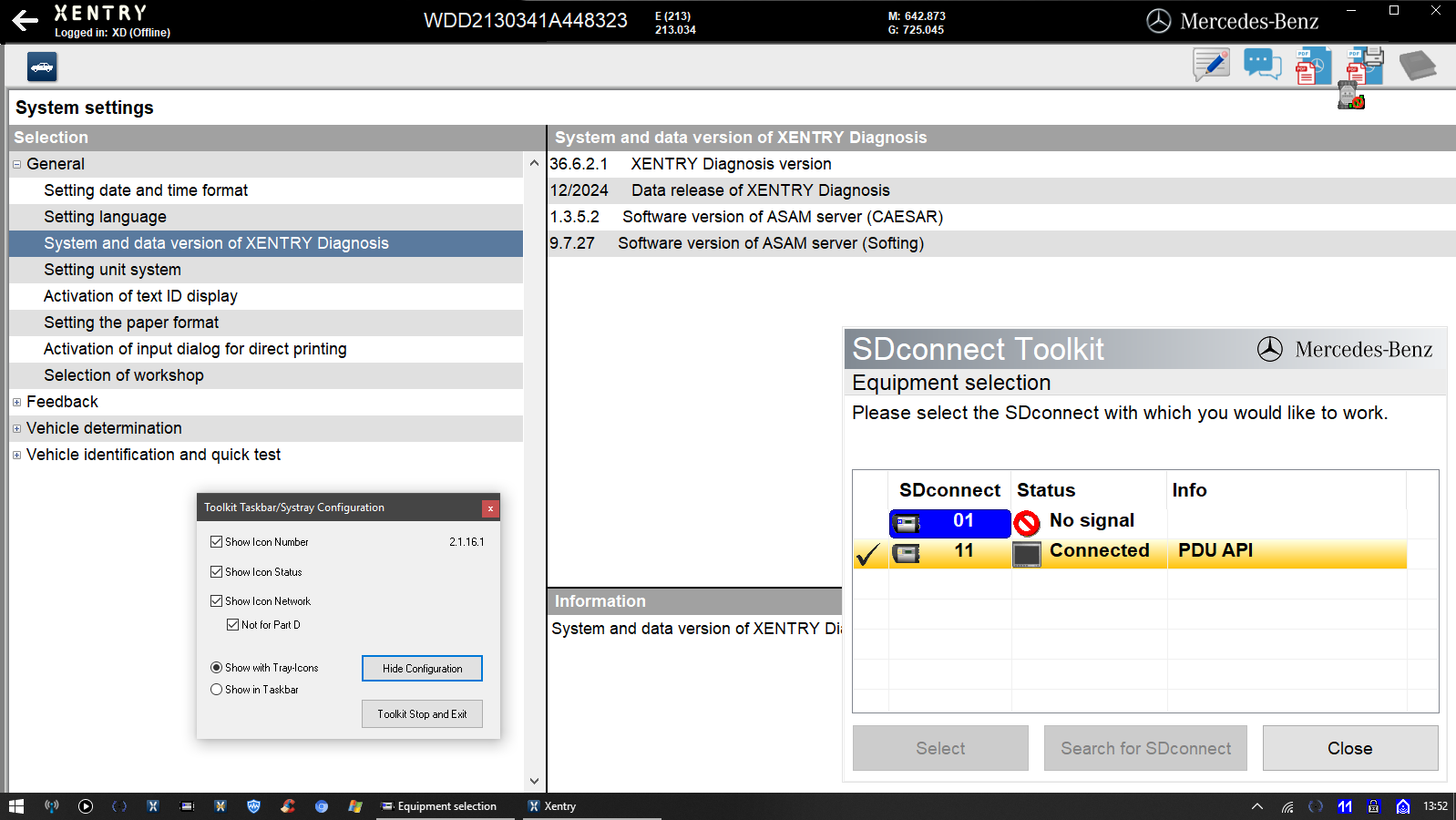
I think i fugured it out, one have to edit CAL.ini and change part_Z to part_T (both \xentry\bin and DAS\bin). Haven't tested it with a car yet, but in the workbench Xentry and DAS can see SDconnect.
Please test and confirm.
Xentry Modle
Edit ~~ change drivers=Z (or P)(but it is a variable) to part_T
C:\Program Files (x86)\Mercedes-Benz\Xentry\bin\Caesar64\asam3d.ini
After the changes are complete, restart XENTRY. It is back to Z (or P).
If it is T (the parameters remain unchanged), it is successful.
your fix not correctly.
DTS9.04.016
MB software
206223coding
M6+ Pro,C3
DS,Citroen,Peugeot Online
Lexus online//DST010
Reputation:
131
Thanks Given: 173
Thanks Received: 459 (66 Posts)
Posts:
135
Threads:
8
Joined: Mar 2011
Once again I repeat my request for assistance. Would somebody kindly explain to me how to configure xentry 03 or 06 2024 to work with an sdconnect.
If anyone would share this info either here or by private message, I would be very grateful.
Thanks given by:
Reputation:
2,489
Thanks Given: 87
Thanks Received: 3060 (219 Posts)
Posts:
375
Threads:
18
Joined: Feb 2014
Oh, so a know-it-all, who can nonetheless well read and understands everything?
Nobody owes anyone anything here. If something doesn't suit them, they should be able to solve their own wish lists and not just parasitize on other people's time-consuming work.
ADD 
>>>

Reputation:
131
Thanks Given: 173
Thanks Received: 459 (66 Posts)
Posts:
135
Threads:
8
Joined: Mar 2011
I never found the need to throw personal insults at anyone on the forum, I am not going to start now.
If I find my own solution, I will of course be more than happy to assist others.
Thanks given by:
Reputation:
3
Thanks Given: 15
Thanks Received: 15 (12 Posts)
Posts:
22
Threads:
3
Joined: Aug 2024
Has Anyone got this to work? SD Toolkit working well, Diagnosis works fine too, but Xentry/DAS cannot communicate, no errors why?
I feel its about integrating SD Connect to the 06.2024 Xentry Installation? Anyone have any ideas? - I know SDtoolkit is fine as i can flash the device etc?
Thanks in Advance...
H
Thanks given by: